








I started looking at MoneyLion as a practical finance app rather than as a replacement for every banking tool on my phone. That distinction matters. It brings banking, cash-back opportunities, cash advances, and personal-loan offers into one place, which can be convenient when I want a single dashboard for everyday money decisions. It is free to install, aimed at everyone, and developed by MoneyLion Inc., but “free” does not mean every financial product inside it will suit every situation.
My overall impression is that it works best as a financial hub for people who want more visibility and occasional access to short-term options. It is less convincing as the only app I would trust for long-term financial planning. The useful parts are the way its different services sit together and the chance to review offers from one account. The more careful parts involve eligibility, repayment, offer terms, and the temptation to treat quick access to money as a normal part of a monthly budget.
How the current MoneyLion experience comes together
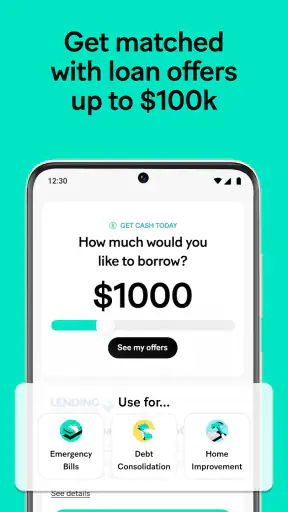
The app belongs to the finance category, but it does not focus on just one job. I can use it to look at banking features, explore cash-back possibilities, consider a fast cash advance, or review personal-loan offers. That broad approach is its main identity. Instead of opening one app for spending and another for borrowing, I get a combined view that encourages me to think about those choices together.
That can be genuinely helpful in an everyday situation. Imagine I have a utility bill due before payday and I am checking whether a cash advance could bridge the gap. I can also look at my broader account activity and consider whether the shortfall is a one-off timing problem or evidence that my regular budget is too tight. I appreciate that context because a borrowing button on its own makes a quick decision feel simpler than it really is.
At the same time, the combined design requires discipline. Cash back can feel like a reason to spend, while a fast advance can feel like an easy answer to a recurring problem. I would use the app to gather information and compare my options, not as permission to spend more or borrow automatically. That mindset makes a substantial difference to whether the service feels useful or stressful.
What I noticed about the app’s maturity
MoneyLion has been available since May 19, 2016, so this is not a brand-new experiment trying to prove that people want mobile finance tools. Its current version is 7.158.0, and that combination of a long-running product with a modern version number suggests an app that has continued to evolve rather than remaining frozen in its original form.
The audience is also substantial: the app has passed five million installs, with an average rating of 4.5 from around 218,000 ratings and roughly 42,000 written reviews. Those figures do not tell me whether every financial product is right for me, but they do show that the app has reached a large mobile audience and generated plenty of user feedback. I would still read the terms for a specific offer instead of treating popularity as a guarantee of value.
On my device, the most important question is not whether the app contains many sections. It is whether I can understand what I am being offered before making a decision. A finance app can be polished and still be unhelpful if the user rushes through an offer without checking repayment details, eligibility conditions, or the difference between a promotional benefit and a regular feature.
What the recent version means for everyday users
The current version gives existing users a reason to keep the app updated, especially if they depend on it for regular account access. In a finance app, version changes are not merely cosmetic: stability, sign-in reliability, and clear presentation matter because a confusing screen can affect a real money decision. I see the version number as evidence of ongoing product maintenance, not as proof that every part of the experience has changed dramatically.
I would approach updates in a measured way. After installing a new version, I would check that my usual banking view, cash-back area, and offer screens are still easy to find before I need them urgently. I would also avoid assuming that an updated interface changes the financial terms of an offer. The app’s presentation may improve while the actual conditions still require careful reading.
This is one of the less obvious habits that makes MoneyLion safer to use: separate the app update from the financial choice. A new screen can make a product look more accessible, but it does not automatically make borrowing cheaper, more appropriate, or more predictable. I find it useful to pause, open the details, and write down the repayment obligation before accepting anything.
Cash back is most useful when it follows spending I already planned
The cash-back side makes the most sense to me when I treat it as a discount on purchases I was going to make anyway. If I open the app looking for a reason to buy something, the feature works against my budget. If I check it before a planned purchase and compare the final value with my usual shopping option, it can be a practical extra.
My preferred workflow would be simple: decide what I need, check whether a relevant offer is available, read its conditions, and then confirm that the offer does not require unnecessary spending. I would not assume that every displayed opportunity produces money in the same way or on the same schedule. The details matter, and the most attractive headline is not always the most useful result after restrictions are considered.
That makes the cash-back feature different from a traditional bank account. A normal bank focuses on holding and moving money, while a shopping-reward service may focus narrowly on purchases. MoneyLion combines the two perspectives, which saves time but also creates more chances for me to confuse a reward with income. I consider cash back a bonus, never a reliable part of my monthly cash flow.
Cash advances require a stricter personal rule
The fast cash advance option is likely to attract people during a tight week, but speed is not the same as affordability. Before using it, I would ask three practical questions: what exact amount will I receive, what will I need to repay and when, and what happens if my next paycheck is already committed to other bills? If I cannot answer those questions clearly, I would not proceed.
A useful test is to imagine the next pay cycle without the advance. If repaying it would force me to borrow again for groceries, transport, or housing, the advance is only moving the problem forward. In that case, I would rather use the app to understand my position and look for a longer-term budget change than rely on repeated short-term access.
This is where MoneyLion should not be confused with a conventional emergency fund. An emergency fund gives me money I already set aside; an advance brings future income into the present. Those tools may solve different problems, and the second one can create pressure later. The app makes access convenient, so the responsibility to slow down belongs with me.
Personal-loan offers are for comparison, not automatic acceptance
The personal-loan area can be useful when I want to review possible borrowing routes without contacting several providers separately. I like the idea of seeing offers in one place, but I would treat each offer as a starting point for comparison. The important information is the total repayment, the schedule, and the consequences of missing a payment, not simply the amount that appears available.
I would compare an offer with my existing bank, a credit union, or another reputable lender when those alternatives are available. A convenient in-app offer may save time, but convenience alone is not a financial advantage. If another option has clearer terms or a lower overall cost, I would choose clarity and affordability over keeping everything inside one application.
There is also a useful distinction between exploring an offer and needing a loan. I can use the app to understand what might be available without treating the result as a recommendation to borrow. That separation helps me avoid a common mistake: opening a finance app with a small question and leaving with a much larger commitment simply because the option was presented at the right moment.
How it compares with ordinary banking alternatives
A traditional bank app is usually better when my priority is a familiar account relationship, routine payments, and a narrow focus on deposits and transactions. A dedicated cash-back service may be better when I care mainly about shopping rewards and want fewer borrowing prompts. A budgeting app may be better when my central goal is category tracking and long-term planning.
MoneyLion’s advantage is the combination. I can move from everyday banking to rewards and then to funding options without changing apps. That is convenient for someone who wants a broad financial dashboard and is comfortable evaluating several types of product. The trade-off is that the experience can feel busier than a focused banking app, and the presence of multiple financial options may encourage decisions I did not originally plan to make.
I would therefore choose it as a companion rather than automatically replacing every other tool. Someone who already has a bank they trust and only wants a clean transaction history may find MoneyLion broader than necessary. Someone who wants to explore cash back and borrowing choices from one mobile location may appreciate its wider scope.
Small workflows that make the app more useful
One workflow I find particularly sensible is separating “check” sessions from “act” sessions. I can open the app to inspect my banking position or browse an offer, then close it without accepting anything. Later, after comparing the terms with my budget, I can return to make a decision. This removes the pressure of making a commitment while I am still gathering information.
A second useful habit is to keep a personal note of any advance or loan obligation outside the app. I would record the amount, repayment date, and the bill it is intended to cover. That protects me from the false feeling that the money has disappeared from my responsibilities simply because the app shows a successful transfer. A separate reminder also helps if I do not open the app every day.
A third insight concerns cash back: I would judge an offer by the net result after normal spending, not by the reward headline. If I have to change stores, buy more than planned, or accept a less suitable product, the reward may not be worth the effort. This is especially important in a combined finance app, where rewards and available funds appear close to one another and can blur the difference between saving and spending.
Where the experience still needs caution
The biggest limitation is not necessarily a missing button; it is the mental load created by putting several financial services together. Banking, rewards, advances, and loan offers each require a different kind of attention. A user who wants one uncomplicated account may find the broader menu distracting, particularly when money is already tight.
Eligibility and terms can also vary from one financial product to another. I would never assume that seeing a feature means I will receive the same access, amount, or conditions as another user. The responsible approach is to open the full details for the specific offer shown to me and decide only after I understand the obligation.
The app is also not a substitute for financial advice tailored to a complicated situation. If I were dealing with several debts, irregular income, or a serious repayment problem, I would want help from a qualified adviser or a nonprofit service rather than relying only on in-app choices. MoneyLion can help me organize options, but it cannot make a difficult budget sustainable by itself.
People who dislike promotional discovery may also prefer a simpler bank. If I want an app that does one job quietly, the combination of rewards and borrowing options may feel like unnecessary noise. Likewise, anyone looking for a guaranteed emergency fund, a full investment plan, or a complete debt-management program should not assume that this app alone covers those needs.
What existing users should watch as the product evolves
Because the app has continued through multiple versions, I would watch how clearly future updates explain changes to navigation and financial-product presentation. For me, the best improvement would be less friction around understanding an offer: plain language, visible repayment information, and a clear separation between account activity, rewards, and borrowing decisions.
I would also pay attention to whether the app remains useful without encouraging unnecessary engagement. A finance tool should help me make deliberate choices, not make me feel that I need to check every new opportunity. The more naturally I can review my position, compare terms, and leave without acting, the more confidence I have in using it responsibly.
Existing users should keep their own records rather than relying entirely on the app’s changing layout. Saving confirmations, noting repayment dates, and reviewing account activity regularly are sensible habits with any financial service. They become even more valuable when one application contains several different products and screens.
My recommendation for the right kind of user
I would recommend MoneyLion to someone who wants a free, broad finance app and is willing to read carefully before using its cash advance or personal-loan features. It is especially appealing if I want banking and cash-back discovery together, or if I prefer reviewing possible financial options from one mobile dashboard instead of visiting several services.
I would be more cautious recommending it to someone who is already using advances repeatedly, wants a very quiet banking interface, or needs a detailed long-term plan for debt and savings. In those cases, a traditional bank, a dedicated budgeting tool, or professional guidance may be a better fit. The app can support a plan, but it should not become the plan.
MoneyLion is free and carries an Everyone age rating, which makes it accessible to a wide audience, but accessibility should not be mistaken for simplicity. Its strongest quality is the range of financial tasks it brings together. Its main challenge is asking me to stay thoughtful when convenient access, rewards, and borrowing choices appear in the same place.
After using it as a practical finance companion, I see the best value in its flexibility rather than in any single feature. I would keep it updated, use cash back only for planned spending, treat advances as an exceptional bridge, and compare every loan offer with alternatives. Used that way, it can make everyday money management more convenient. Used impulsively, its convenience can make costly decisions feel easier than they should.


